11. Mix Recipes - Flexible Mix-Rezepte
Übersicht
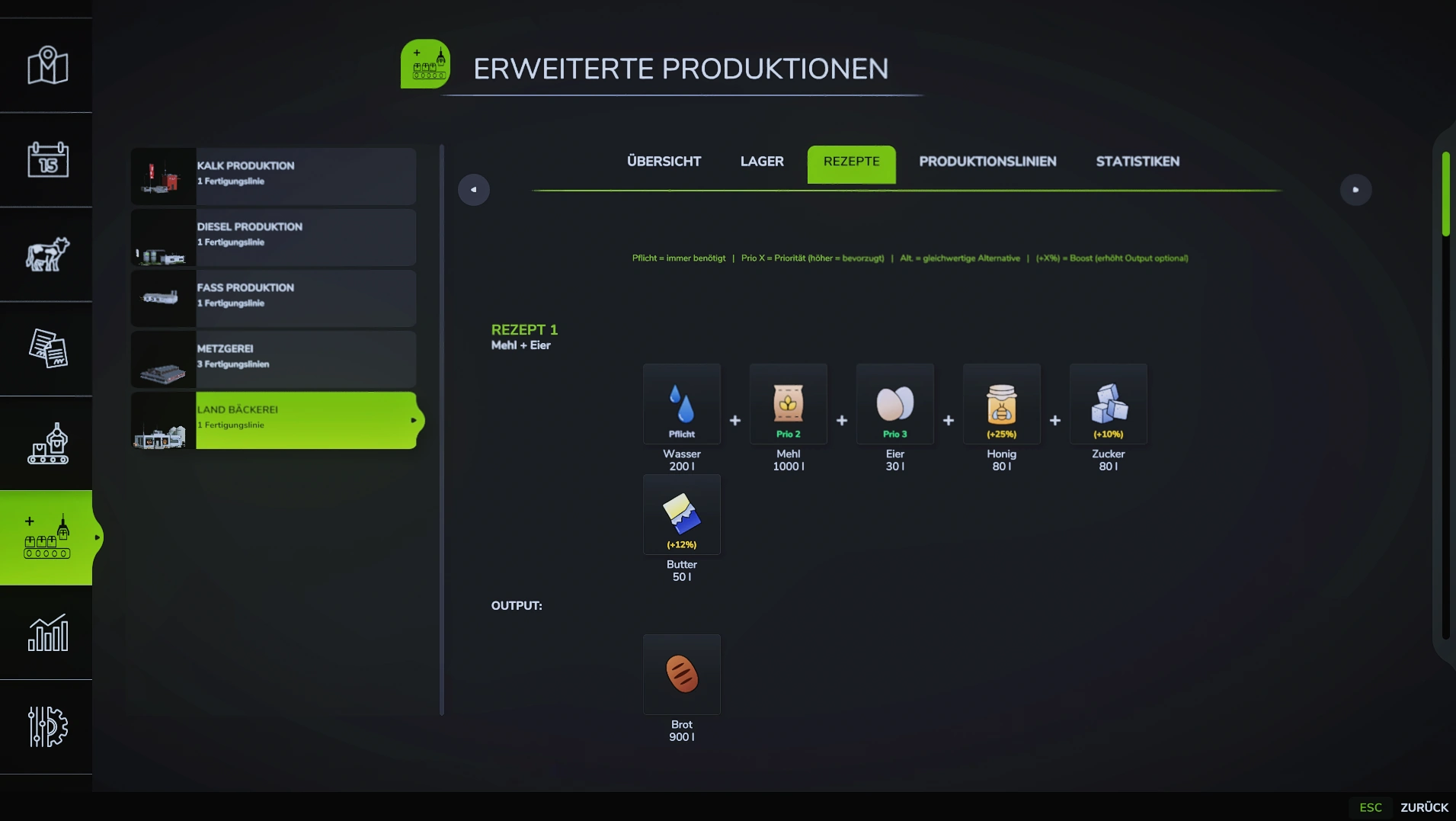
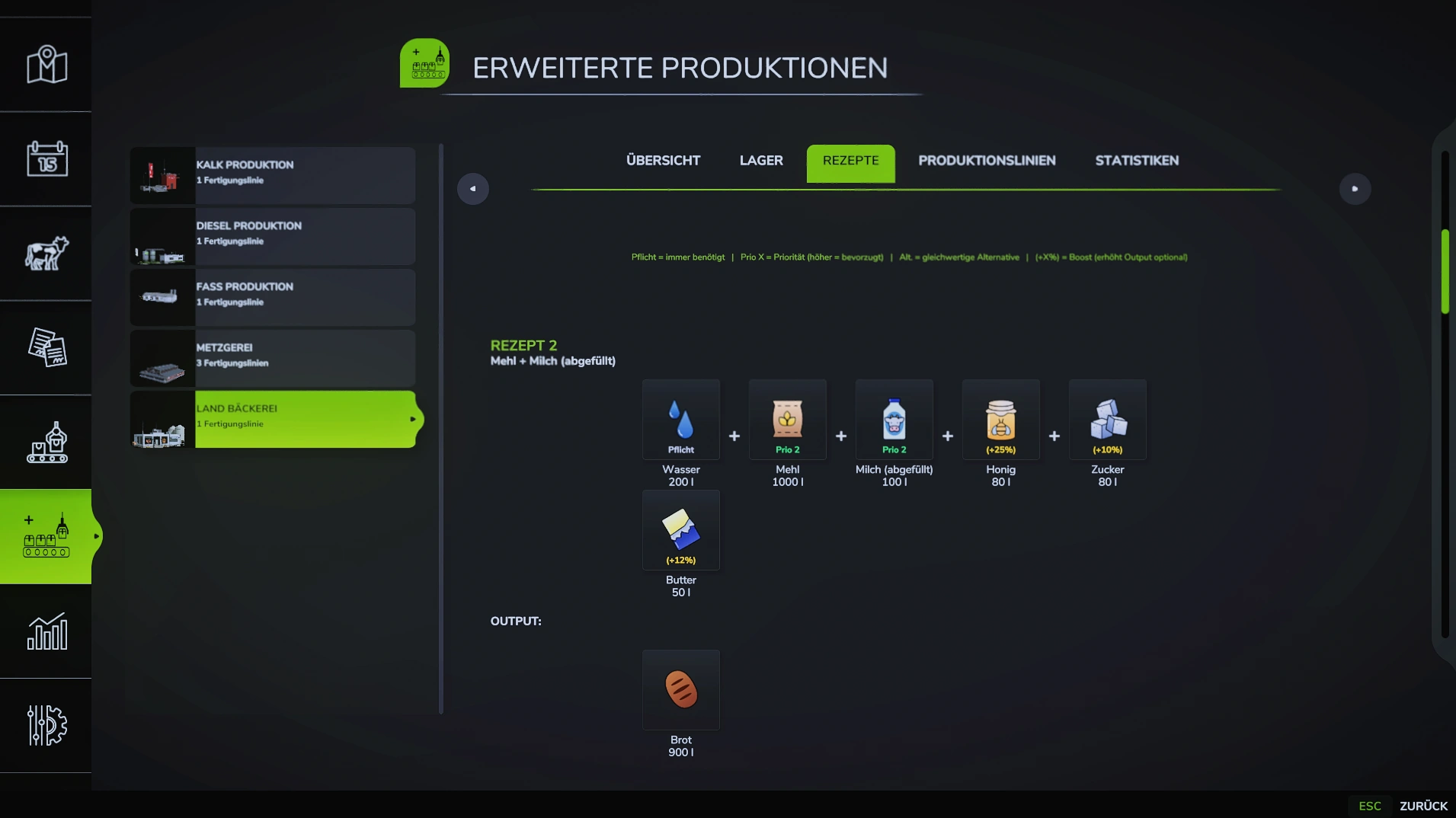
 Mit Mix Recipes können alternative Inputs und Boost-Faktoren für Produktionen definiert werden.
🔄 Beispiel: Eine Mühle kann WHEAT, BARLEY oder OAT verarbeiten - das System wählt automatisch den verfügbaren Input aus.
Funktionsweise
- Alternative Inputs: Nur EINES von mehreren Inputs wird benötigt
- Mix-Gruppen: Gruppieren alternative Inputs (mix=0, mix=1, mix=2, etc.)
- Boost-Inputs: Erhöhen Output wenn vorhanden
- Mix-Modi: Verschiedene Strategien zur Input-Auswahl
- Boost-Modi: Verschiedene Strategien zur Boost-Berechnung
- Recipe Templates: Vordefinierte Rezepte mit eigenen Mix/Boost-Modi
Basis-Struktur
<placeable>
    <productionExtension>
        <!-- Alle Inputs (inkl. mix/priority/boostFactor) gehören in <productions> -->
        <productions>
            <production id="muehle" name="Mühle" cyclesPerHour="4" costsPerActiveHour="5">
                <inputs>
                    <!-- mix=0: immer benötigt -->
                    <input fillType="WATER" amount="100" mix="0"/>

                    <!-- mix=1: Alternative Getreide (nur eines benötigt) -->
                    <input fillType="WHEAT"  amount="1000" mix="1" priority="3"/>
                    <input fillType="BARLEY" amount="1000" mix="1" priority="2"/>
                    <input fillType="OAT"    amount="1000" mix="1" priority="1"/>

                    <!-- Boost-Inputs (erhöhen Output, optional) -->
                    <input fillType="STONE" amount="50" boostFactor="0.05" optional="true"/>
                </inputs>
                <outputs>
                    <output fillType="FLOUR" amount="900"/>
                </outputs>
            </production>
        </productions>

        <!-- mixInputs: NUR mixMode und boostMode angeben – keine Inputs hier! -->
        <mixInputs>
            <production id="muehle" mixMode="DESC" boostMode="MOST"/>
        </mixInputs>
    </productionExtension>
</placeable>
Alle Inputs (auch alternative und Boost-Inputs) müssen in <productions> stehen.
<mixInputs> enthält ausschließlich die Produktions-ID mit mixMode und boostMode.
Inputs direkt in <mixInputs><production> werden vom System ignoriert.
Mix-Modi (mixMode)
| Modus | Beschreibung |
|---|---|
ASC | Aufsteigend nach FillLevel (wenigster Input zuerst) |
DESC | Absteigend nach FillLevel (meister Input zuerst) |
RANDOM | Zufällige Auswahl |
PRIORITY | Nach Priority-Wert (höher = bevorzugt) |
TEMPLATE | Verwendet Recipe Templates |
ASC - Aufsteigend
Verwendet Input mit wenigstem FillLevel:
<!-- Inputs in <productions> -->
<productions>
    <production id="muehle" ...>
        <inputs>
            <input fillType="WHEAT"  amount="1000" mix="1"/>
            <input fillType="BARLEY" amount="1000" mix="1"/>
            <input fillType="OAT"    amount="1000" mix="1"/>
        </inputs>
        <outputs><output fillType="FLOUR" amount="900"/></outputs>
    </production>
</productions>

<!-- mixMode in <mixInputs> -->
<mixInputs>
    <production id="muehle" mixMode="ASC"/>
</mixInputs>
Beispiel:
- WHEAT: 5000 Liter
- BARLEY: 2000 Liter
- OAT: 8000 Liter
→ System wählt BARLEY (wenigster FillLevel)
Nutzen: Verbraucht zuerst Inputs die knapp werden!
DESC - Absteigend
Verwendet Input mit meistem FillLevel:
<productions>
    <production id="muehle" ...>
        <inputs>
            <input fillType="WHEAT"  amount="1000" mix="1"/>
            <input fillType="BARLEY" amount="1000" mix="1"/>
            <input fillType="OAT"    amount="1000" mix="1"/>
        </inputs>
        <outputs><output fillType="FLOUR" amount="900"/></outputs>
    </production>
</productions>
<mixInputs>
    <production id="muehle" mixMode="DESC"/>
</mixInputs>
Beispiel:
- WHEAT: 5000 Liter
- BARLEY: 2000 Liter
- OAT: 8000 Liter
→ System wählt OAT (meister FillLevel)
Nutzen: Verbraucht zuerst Inputs die im Überfluss vorhanden sind!
RANDOM - Zufällig
Wählt zufällig einen verfügbaren Input:
<productions>
    <production id="muehle" ...>
        <inputs>
            <input fillType="WHEAT"  amount="1000" mix="1"/>
            <input fillType="BARLEY" amount="1000" mix="1"/>
            <input fillType="OAT"    amount="1000" mix="1"/>
        </inputs>
        <outputs><output fillType="FLOUR" amount="900"/></outputs>
    </production>
</productions>
<mixInputs>
    <production id="muehle" mixMode="RANDOM"/>
</mixInputs>
Nutzen: Für abwechslungsreiche Produktion!
PRIORITY - Prioritäts-basiert
Verwendet Input mit höchster Priorität (wenn vorhanden):
<productions>
    <production id="muehle" ...>
        <inputs>
            <input fillType="WHEAT"  amount="1000" mix="1" priority="3"/>
            <input fillType="BARLEY" amount="1000" mix="1" priority="2"/>
            <input fillType="OAT"    amount="1000" mix="1" priority="1"/>
        </inputs>
        <outputs><output fillType="FLOUR" amount="900"/></outputs>
    </production>
</productions>
<mixInputs>
    <production id="muehle" mixMode="PRIORITY"/>
</mixInputs>
Verhalten:
- Prüft zuerst WHEAT (priority=3)
- Wenn nicht genug: BARLEY (priority=2)
- Wenn nicht genug: OAT (priority=1)
Nutzen: Bevorzugte Inputs zuerst verwenden!
TEMPLATE - Recipe Templates
Verwendet vordefinierte Recipe Templates:
<production id="muehle" mixMode="TEMPLATE">
    <recipeTemplate name="Weizen-Mix">
        <inputs>
            <input fillType="WHEAT" amount="1000" mix="0"/>
        </inputs>
        <outputs>
            <output fillType="FLOUR" amount="900"/>
        </outputs>
    </recipeTemplate>

    <recipeTemplate name="Gersten-Mix">
        <inputs>
            <input fillType="BARLEY" amount="1000" mix="0"/>
        </inputs>
        <outputs>
            <output fillType="FLOUR" amount="850"/>
        </outputs>
    </recipeTemplate>
</production>
Siehe auch: Production Templates
Boost-Modi (boostMode)
| Modus | Beschreibung |
|---|---|
ASC | Aufsteigend nach FillLevel |
DESC | Absteigend nach FillLevel |
MOST | Input mit meistem FillLevel |
LEAST | Input mit wenigstem FillLevel |
ALL | Alle verfügbaren Boost-Inputs verwenden |
ASC - Aufsteigend
Verwendet Boost-Input mit wenigstem FillLevel:
<productions>
    <production id="muehle" ...>
        <inputs>
            <input fillType="WATER" amount="100" boostFactor="0.1"  optional="true"/>
            <input fillType="STONE" amount="50"  boostFactor="0.05" optional="true"/>
        </inputs>
        <outputs><output fillType="FLOUR" amount="900"/></outputs>
    </production>
</productions>
<mixInputs>
    <production id="muehle" boostMode="ASC"/>
</mixInputs>
Beispiel:
- WATER: 5000 Liter
- STONE: 2000 Liter
→ System wählt STONE für Boost
DESC - Absteigend
Verwendet Boost-Input mit meistem FillLevel:
<productions>
    <production id="muehle" ...>
        <inputs>
            <input fillType="WATER" amount="100" boostFactor="0.1"  optional="true"/>
            <input fillType="STONE" amount="50"  boostFactor="0.05" optional="true"/>
        </inputs>
        <outputs><output fillType="FLOUR" amount="900"/></outputs>
    </production>
</productions>
<mixInputs>
    <production id="muehle" boostMode="DESC"/>
</mixInputs>
Beispiel:
- WATER: 5000 Liter
- STONE: 2000 Liter
→ System wählt WATER für Boost
MOST - Meister FillLevel
Verwendet Boost-Input mit meistem FillLevel (wie DESC):
<productions>
    <production id="muehle" ...>
        <inputs>
            <input fillType="WATER" amount="100" boostFactor="0.1"  optional="true"/>
            <input fillType="STONE" amount="50"  boostFactor="0.05" optional="true"/>
        </inputs>
        <outputs><output fillType="FLOUR" amount="900"/></outputs>
    </production>
</productions>
<mixInputs>
    <production id="muehle" boostMode="MOST"/>
</mixInputs>
LEAST - Wenigster FillLevel
Verwendet Boost-Input mit wenigstem FillLevel (wie ASC):
<productions>
    <production id="muehle" ...>
        <inputs>
            <input fillType="WATER" amount="100" boostFactor="0.1"  optional="true"/>
            <input fillType="STONE" amount="50"  boostFactor="0.05" optional="true"/>
        </inputs>
        <outputs><output fillType="FLOUR" amount="900"/></outputs>
    </production>
</productions>
<mixInputs>
    <production id="muehle" boostMode="LEAST"/>
</mixInputs>
ALL - Alle Boosts
Verwendet ALLE verfügbaren Boost-Inputs:
<productions>
    <production id="muehle" ...>
        <inputs>
            <input fillType="WATER"      amount="100" boostFactor="0.1"  optional="true"/>
            <input fillType="STONE"      amount="50"  boostFactor="0.05" optional="true"/>
            <input fillType="FERTILIZER" amount="20"  boostFactor="0.03" optional="true"/>
        </inputs>
        <outputs><output fillType="FLOUR" amount="900"/></outputs>
    </production>
</productions>
<mixInputs>
    <production id="muehle" boostMode="ALL"/>
</mixInputs>
Verhalten:
- Wenn alle vorhanden: 0.1 + 0.05 + 0.03 = 0.18 (18% Boost)
- Wenn nur WATER: 0.1 (10% Boost)
- Wenn keine: 0 (kein Boost)
Achtung: Kann zu sehr hohen Boosts führen!
Mix-Gruppen (mix)
mix=0 - Erforderlich
Inputs mit mix="0" sind immer erforderlich:
<input fillType="WATER" amount="200" mix="0"/>
Verhalten:
- Produktion startet nur wenn vorhanden
- Kann nicht durch andere Inputs ersetzt werden
mix=1, 2, 3, ... - Alternative Inputs
Inputs mit gleicher Mix-Gruppe sind Alternativen:
<!-- Mix-Gruppe 0: Basis (erforderlich) -->
<input fillType="WATER" amount="200" mix="0"/>

<!-- Mix-Gruppe 1: Alternative Getreide (nur eines benötigt) -->
<input fillType="WHEAT" amount="1000" mix="1"/>
<input fillType="BARLEY" amount="1000" mix="1"/>
<input fillType="OAT" amount="1000" mix="1"/>

<!-- Mix-Gruppe 2: Alternative Öle (nur eines benötigt) -->
<input fillType="CANOLA" amount="500" mix="2"/>
<input fillType="SUNFLOWER" amount="500" mix="2"/>
Verhalten:
- WATER: Immer benötigt
- Eines von WHEAT/BARLEY/OAT benötigt
- Eines von CANOLA/SUNFLOWER benötigt
Input-Parameter
| Parameter | Beschreibung | Pflicht | Standard |
|---|---|---|---|
fillType | FillType-Name | ✅ | - |
amount | Menge in Litern | ✅ | - |
mix | Mix-Gruppe (0 = erforderlich) | ❌ | 0 |
priority | Priorität bei PRIORITY mixMode | ❌ | 0 |
boostFactor | Boost-Faktor (z.B. 0.1 = +10%) | ❌ | 0 |
optional | Input ist optional | ❌ | false |
Boost-Faktoren
Inputs mit boostFactor erhöhen den Output:
<productions>
    <production id="muehle" ...>
        <inputs>
            <!-- Haupt-Input -->
            <input fillType="WHEAT" amount="1000" mix="1"/>

            <!-- Boost-Inputs -->
            <input fillType="WATER" amount="100" boostFactor="0.1"  optional="true"/>  <!-- +10% -->
            <input fillType="STONE" amount="50"  boostFactor="0.05" optional="true"/>  <!-- +5% -->
        </inputs>
        <outputs><output fillType="FLOUR" amount="900"/></outputs>
    </production>
</productions>
<mixInputs>
    <production id="muehle" mixMode="DESC" boostMode="MOST"/>
</mixInputs>
Berechnung:
Output = Base-Output + (Base-Output × boostFactor)
Beispiel:
- Base-Output: 900 Liter FLOUR
- boostFactor: 0.1 (10%)
- Mit Boost: 900 + (900 × 0.1) = 990 Liter FLOUR
Mehrere Boosts (boostMode="ALL")
<productions>
    <production id="muehle" ...>
        <inputs>
            <input fillType="WHEAT"      amount="1000" mix="1"/>
            <input fillType="WATER"      amount="100"  boostFactor="0.1"  optional="true"/>  <!-- +10% -->
            <input fillType="STONE"      amount="50"   boostFactor="0.05" optional="true"/>  <!-- +5% -->
            <input fillType="FERTILIZER" amount="20"   boostFactor="0.03" optional="true"/>  <!-- +3% -->
        </inputs>
        <outputs><output fillType="FLOUR" amount="900"/></outputs>
    </production>
</productions>
<mixInputs>
    <production id="muehle" boostMode="ALL"/>
</mixInputs>
Berechnung:
Gesamt-Boost = 0.1 + 0.05 + 0.03 = 0.18
Output = 900 + (900 × 0.18) = 1062 Liter FLOUR
Optional Inputs
Inputs mit optional="true" sind nicht erforderlich:
<productions>
    <production id="muehle" ...>
        <inputs>
            <!-- Erforderlich -->
            <input fillType="WHEAT" amount="1000" mix="1"/>

            <!-- Optional - kann weggelassen werden -->
            <input fillType="WATER" amount="100" boostFactor="0.1" optional="true"/>
        </inputs>
        <outputs><output fillType="FLOUR" amount="900"/></outputs>
    </production>
</productions>
<mixInputs>
    <production id="muehle" mixMode="DESC"/>
</mixInputs>
Verhalten:
- Produktion startet auch ohne WATER
- Wenn WATER vorhanden: +10% Output
- Wenn WATER fehlt: Normaler Output
Recipe Templates
Für mixMode="TEMPLATE" können vordefinierte Rezepte definiert werden:
<mixInputs>
    <production id="futtermuehle" mixMode="TEMPLATE">
        <!-- Basis-Futter -->
        <recipeTemplate name="Basis-Futter">
            <inputs>
                <input fillType="WHEAT" amount="800" mix="0"/>
                <input fillType="BARLEY" amount="200" mix="0"/>
            </inputs>
            <outputs>
                <output fillType="PIG_FOOD" amount="1000"/>
            </outputs>
        </recipeTemplate>

        <!-- Premium-Futter -->
        <recipeTemplate name="Premium-Futter" mixMode="ASC" boostMode="MOST">
            <inputs>
                <input fillType="WHEAT" amount="600" mix="0"/>
                <input fillType="OAT" amount="300" mix="0"/>
                <input fillType="SOYBEAN" amount="100" mix="0" boostFactor="0.3"/>
            </inputs>
            <outputs>
                <output fillType="PIG_FOOD" amount="1300"/>
            </outputs>
        </recipeTemplate>

        <!-- Verstecktes Spezial-Rezept -->
        <recipeTemplate name="Spezial-Mix" visible="false">
            <inputs>
                <input fillType="WHEAT" amount="500" mix="0"/>
                <input fillType="BARLEY" amount="300" mix="0"/>
                <input fillType="OAT" amount="200" mix="0"/>
                <input fillType="SUNFLOWER" amount="100" boostFactor="0.5"/>
            </inputs>
            <outputs>
                <output fillType="PIG_FOOD" amount="1500"/>
            </outputs>
        </recipeTemplate>
    </production>
</mixInputs>
📁 Siehe: examples/03b_MixRecipes_Templates.xml
RecipeTemplate Parameter
| Parameter | Beschreibung | Pflicht | Standard |
|---|---|---|---|
name | Template-Name | ✅ | - |
mixMode | Überschreibt Production mixMode | ❌ | Production mixMode |
boostMode | Überschreibt Production boostMode | ❌ | Production boostMode |
visible | Template in GUI anzeigen | ❌ | true |
Beispiele
Beispiel 1: Einfache Alternative Inputs
Mühle kann WHEAT, BARLEY oder OAT verarbeiten:
<productions>
    <production id="muehle" name="Mühle" cyclesPerHour="4" costsPerActiveHour="5">
        <inputs>
            <!-- Alternative Getreide (nur eines benötigt) -->
            <input fillType="WHEAT"  amount="1000" mix="1" priority="3"/>
            <input fillType="BARLEY" amount="1000" mix="1" priority="2"/>
            <input fillType="OAT"    amount="1000" mix="1" priority="1"/>

            <!-- Boost-Inputs -->
            <input fillType="WATER" amount="100" boostFactor="0.1"  optional="true"/>
            <input fillType="STONE" amount="50"  boostFactor="0.05" optional="true"/>
        </inputs>
        <outputs>
            <output fillType="FLOUR" amount="900"/>
        </outputs>
    </production>
</productions>

<mixInputs>
    <production id="muehle" mixMode="DESC" boostMode="MOST"/>
</mixInputs>
📁 Siehe: examples/03_MixRecipes.xml
Beispiel 2: Mehrere Mix-Gruppen
Verschiedene Mix-Gruppen für verschiedene Input-Typen:
<productions>
    <production id="oelmuehle" name="Ölmühle" cyclesPerHour="4" costsPerActiveHour="5">
        <inputs>
            <!-- Mix-Gruppe 0: Basis (erforderlich) -->
            <input fillType="WATER" amount="100" mix="0"/>

            <!-- Mix-Gruppe 1: Alternative Ölsaaten -->
            <input fillType="CANOLA"    amount="1000" mix="1" priority="3"/>
            <input fillType="SUNFLOWER" amount="1000" mix="1" priority="2"/>
            <input fillType="SOYBEAN"   amount="1000" mix="1" priority="1"/>

            <!-- Mix-Gruppe 2: Alternative Zusatzstoffe -->
            <input fillType="SALT"  amount="50" mix="2" priority="2"/>
            <input fillType="SUGAR" amount="50" mix="2" priority="1"/>

            <!-- Boost-Inputs -->
            <input fillType="FERTILIZER" amount="20" boostFactor="0.05" optional="true"/>
        </inputs>
        <outputs>
            <output fillType="OIL" amount="800"/>
        </outputs>
    </production>
</productions>

<mixInputs>
    <production id="oelmuehle" mixMode="PRIORITY" boostMode="ALL"/>
</mixInputs>
Verhalten:
- WATER: Immer benötigt
- Eines von CANOLA/SUNFLOWER/SOYBEAN (CANOLA bevorzugt)
- Eines von SALT/SUGAR (SALT bevorzugt)
- FERTILIZER optional für +5% Boost
Beispiel 3: Recipe Templates mit verschiedenen Modi
Verschiedene Rezepte mit eigenen Mix/Boost-Modi:
<mixInputs>
    <production id="futtermuehle" mixMode="TEMPLATE">
        <!-- Template 1: ASC/MOST -->
        <recipeTemplate name="Basis-Futter" mixMode="ASC" boostMode="MOST">
            <inputs>
                <input fillType="WHEAT" amount="800" mix="0"/>
                <input fillType="BARLEY" amount="200" mix="0"/>
            </inputs>
            <outputs>
                <output fillType="PIG_FOOD" amount="1000"/>
            </outputs>
        </recipeTemplate>

        <!-- Template 2: PRIORITY/ALL -->
        <recipeTemplate name="Premium-Futter" mixMode="PRIORITY" boostMode="ALL">
            <inputs>
                <!-- Basis -->
                <input fillType="WATER" amount="100" mix="0"/>

                <!-- Alternative Getreide -->
                <input fillType="WHEAT" amount="600" mix="1" priority="3"/>
                <input fillType="BARLEY" amount="600" mix="1" priority="2"/>
                <input fillType="OAT" amount="600" mix="1" priority="1"/>

                <!-- Boosts -->
                <input fillType="SOYBEAN" amount="100" boostFactor="0.3"/>
                <input fillType="MINERAL_FEED" amount="50" boostFactor="0.2"/>
            </inputs>
            <outputs>
                <output fillType="PIG_FOOD" amount="1300"/>
            </outputs>
        </recipeTemplate>
    </production>
</mixInputs>
📁 Siehe: examples/03b_MixRecipes_Templates.xml
Beispiel 4: Alle Boost-Inputs (boostMode="ALL")
Mehrere Boost-Inputs gleichzeitig nutzen:
<productions>
    <production id="advanced_mill" name="Erweiterte Mühle" cyclesPerHour="4" costsPerActiveHour="5">
        <inputs>
            <!-- Haupt-Input -->
            <input fillType="WHEAT" amount="1000" mix="1"/>

            <!-- Mehrere Boost-Inputs (alle werden verwendet wenn vorhanden) -->
            <input fillType="WATER"      amount="100" boostFactor="0.1"  optional="true"/>  <!-- +10% -->
            <input fillType="STONE"      amount="50"  boostFactor="0.05" optional="true"/>  <!-- +5% -->
            <input fillType="FERTILIZER" amount="20"  boostFactor="0.03" optional="true"/>  <!-- +3% -->
            <input fillType="LIME"       amount="30"  boostFactor="0.02" optional="true"/>  <!-- +2% -->
        </inputs>
        <outputs>
            <output fillType="FLOUR" amount="900"/>
        </outputs>
    </production>
</productions>
<mixInputs>
    <production id="advanced_mill" mixMode="DESC" boostMode="ALL"/>
</mixInputs>
Maximaler Boost:
0.1 + 0.05 + 0.03 + 0.02 = 0.2 (20% Boost!)
900 + (900 × 0.2) = 1080 Liter Output
Häufige Fehler
❌ Alle Inputs erforderlich statt alternative
Ursache: Alle Inputs haben mix="0"
<!-- FALSCH - alle erforderlich -->
<input fillType="WHEAT" amount="1000" mix="0"/>
<input fillType="BARLEY" amount="1000" mix="0"/>
<input fillType="OAT" amount="1000" mix="0"/>

<!-- RICHTIG - nur eines benötigt -->
<input fillType="WHEAT" amount="1000" mix="1"/>
<input fillType="BARLEY" amount="1000" mix="1"/>
<input fillType="OAT" amount="1000" mix="1"/>
❌ Boost funktioniert nicht
Ursache: boostFactor nicht gesetzt
<!-- FALSCH - kein boostFactor -->
<input fillType="WATER" amount="100"/>

<!-- RICHTIG -->
<input fillType="WATER" amount="100" boostFactor="0.1"/>
❌ Mix-Modus wirkt nicht
Ursache: mixMode nicht in <mixInputs> definiert, oder Inputs fälschlicherweise in <mixInputs> statt <productions>
<!-- FALSCH - Inputs in <mixInputs> werden ignoriert! -->
<mixInputs>
    <production id="muehle" mixMode="DESC">
        <input fillType="WHEAT" amount="1000" mix="1"/>
    </production>
</mixInputs>

<!-- RICHTIG - Inputs in <productions>, mixMode in <mixInputs> -->
<productions>
    <production id="muehle" ...>
        <inputs>
            <input fillType="WHEAT"  amount="1000" mix="1"/>
            <input fillType="BARLEY" amount="1000" mix="1"/>
        </inputs>
        <outputs><output fillType="FLOUR" amount="900"/></outputs>
    </production>
</productions>
<mixInputs>
    <production id="muehle" mixMode="DESC"/>
</mixInputs>
❌ Priority funktioniert nicht
Ursache: mixMode ist nicht PRIORITY
<!-- FALSCH - mixMode ist DESC, priority wird ignoriert -->
<mixInputs>
    <production id="muehle" mixMode="DESC"/>
</mixInputs>

<!-- RICHTIG - mixMode PRIORITY damit priority-Attribut wirkt -->
<productions>
    <production id="muehle" ...>
        <inputs>
            <input fillType="WHEAT" amount="1000" mix="1" priority="3"/>
        </inputs>
        <outputs><output fillType="FLOUR" amount="900"/></outputs>
    </production>
</productions>
<mixInputs>
    <production id="muehle" mixMode="PRIORITY"/>
</mixInputs>
❌ Recipe Template erscheint nicht
Ursache: visible="false" gesetzt
<!-- FALSCH - Template versteckt -->
<recipeTemplate name="Basis" visible="false">

<!-- RICHTIG - Template sichtbar -->
<recipeTemplate name="Basis" visible="true">
<!-- Oder einfach: -->
<recipeTemplate name="Basis">
Mix-Modi Vergleich
| Szenario | Empfohlener Modus | Grund |
|---|---|---|
| Inputs gleichmäßig verbrauchen | ASC | Verbraucht zuerst knapp werdende Inputs |
| Überschüsse abbauen | DESC | Verbraucht zuerst übervolle Silos |
| Abwechslung | RANDOM | Zufällige Auswahl |
| Bevorzugte Inputs | PRIORITY | Klare Prioritäts-Reihenfolge |
| Vordefinierte Rezepte | TEMPLATE | Spieler wählt Rezept aus |
Boost-Modi Vergleich
| Szenario | Empfohlener Modus | Grund |
|---|---|---|
| Knappe Boosts nutzen | ASC / LEAST | Nutzt zuerst knapp werdende Boosts |
| Überschuss-Boosts nutzen | DESC / MOST | Nutzt zuerst überfüllte Boosts |
| Maximaler Output | ALL | Nutzt alle verfügbaren Boosts |
Kombination mit anderen Features
Mit Production Templates
Mix Recipes können mit Production Templates kombiniert werden:
<!-- Production Template (wechselbare Rezepte) -->
<productionTemplates>
    <template id="standard" name="Standard">
        <inputs>
            <input fillType="WHEAT" amount="1000"/>
        </inputs>
        <outputs>
            <output fillType="FLOUR" amount="900"/>
        </outputs>
    </template>
</productionTemplates>

<!-- Mix Recipe: Inputs in <productions>, mixMode in <mixInputs> -->
<productions>
    <production id="muehle" ...>
        <inputs>
            <input fillType="WHEAT"  amount="1000" mix="1"/>
            <input fillType="BARLEY" amount="1000" mix="1"/>
        </inputs>
        <outputs><output fillType="FLOUR" amount="900"/></outputs>
    </production>
</productions>
<mixInputs>
    <production id="muehle" mixMode="DESC"/>
</mixInputs>
Siehe auch: Production Templates
Verwandte Features
- Production Templates - Wechselbare Rezepte
- Seasonal Production - Saisonale Rezepte
Zusammenfassung
✅ Alternative Inputs (nur EINES benötigt) ✅ Mix-Gruppen für verschiedene Input-Typen ✅ 5 Mix-Modi (ASC, DESC, RANDOM, PRIORITY, TEMPLATE) ✅ 5 Boost-Modi (ASC, DESC, MOST, LEAST, ALL) ✅ Boost-Faktoren für erhöhten Output ✅ Optional-Inputs ✅ Recipe Templates mit eigenen Modi ✅ Priority-basierte Auswahl ✅ Savegame-Unterstützung ✅ Multiplayer-kompatibel