11. Production Templates - Wechselbare Rezepte
Übersicht
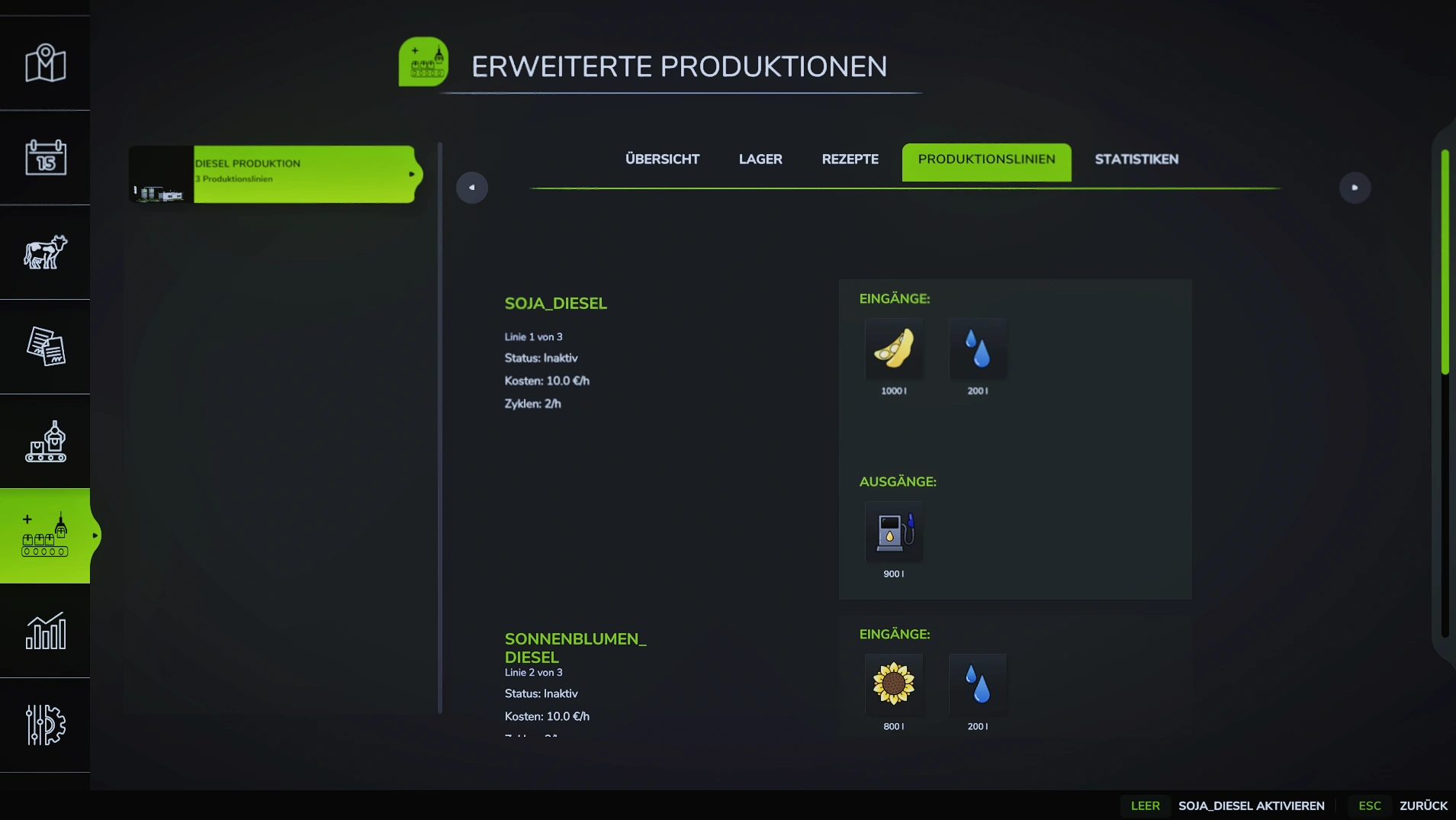
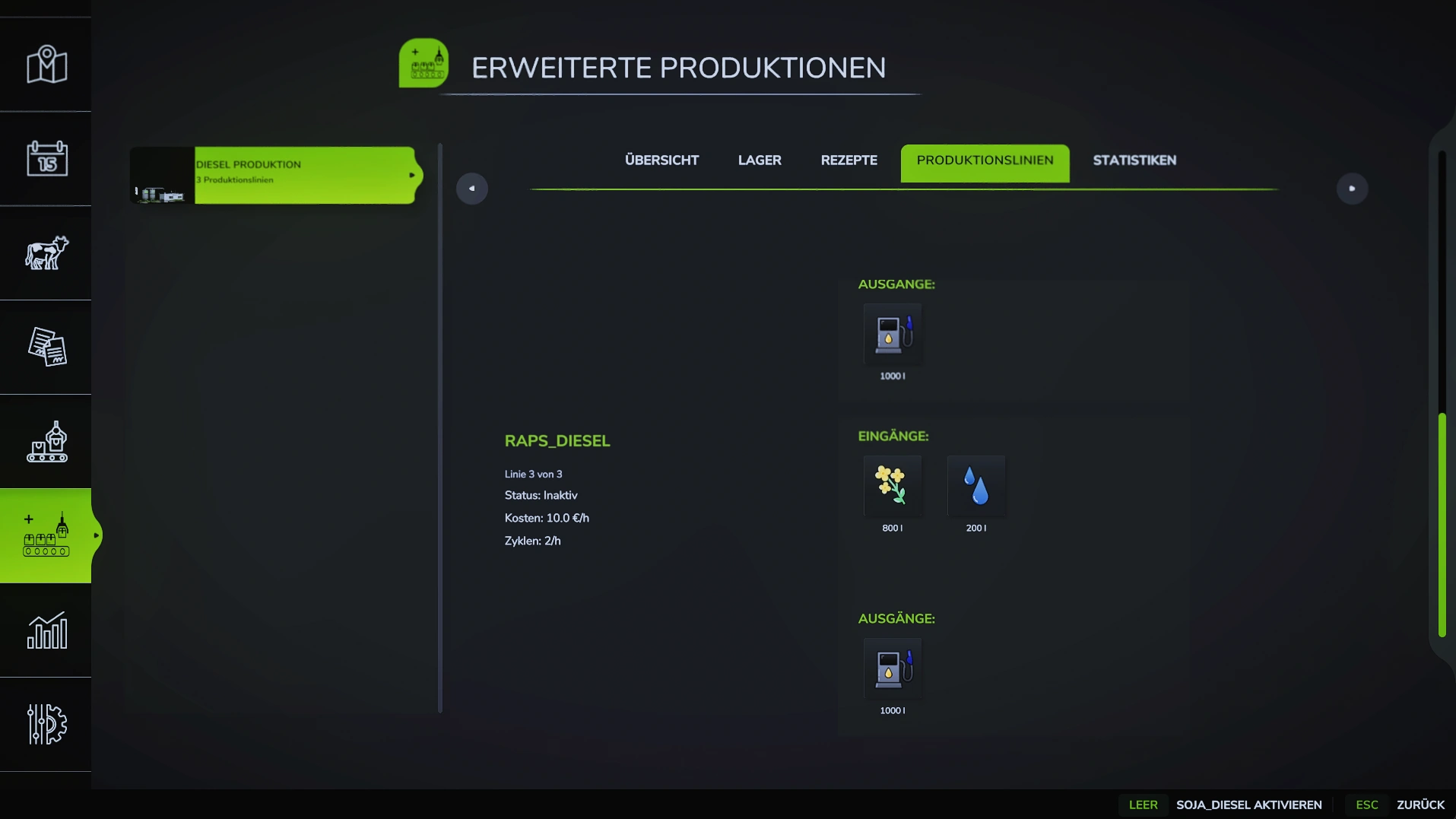
 Mit Production Templates können mehrere alternative Rezepte für eine Produktion definiert werden, zwischen denen der Spieler wechseln kann.
🔄 Beispiel: Eine Bäckerei kann zwischen "Weizenbrot", "Vollkornbrot" und "Premium-Brot" wechseln - jedes mit eigenen Inputs/Outputs.
Funktionsweise
- Mehrere Rezepte: Eine Produktion kann viele Templates haben
- Spieler wählt aus: Templates erscheinen in der GUI zum Wechseln
- Versteckte Templates: Templates können unsichtbar sein (
visible="false") - Background Templates: Laufen automatisch im Hintergrund (
backgroundOnly="true") - Mix-Inputs: Alternative Inputs innerhalb eines Templates
Basis-Struktur
<placeable>
    <productionExtension>
        <!-- Produktion: Basis-Config + Template-Verknüpfung in EINEM Element -->
        <productions>
            <production id="baeckerei" name="Bäckerei" cyclesPerHour="2" costsPerActiveHour="10"
                        templateMode="true" allowedTemplates="weizenbrot,vollkornbrot">
                <!-- Basis-Config: wird von aktivem Template überschrieben -->
                <inputs>
                    <input fillType="FLOUR" amount="1000"/>
                </inputs>
                <outputs>
                    <output fillType="BREAD" amount="800"/>
                </outputs>
            </production>
        </productions>

        <!-- Template-Definitionen -->
        <productionTemplates>
            <template id="weizenbrot" name="Weizenbrot">
                <inputs>
                    <input fillType="FLOUR" amount="1000"/>
                    <input fillType="WATER" amount="200"/>
                </inputs>
                <outputs>
                    <output fillType="BREAD" amount="900"/>
                </outputs>
            </template>

            <template id="vollkornbrot" name="Vollkornbrot">
                <inputs>
                    <input fillType="FLOUR" amount="800"/>
                    <input fillType="OAT" amount="200"/>
                    <input fillType="WATER" amount="200"/>
                </inputs>
                <outputs>
                    <output fillType="BREAD" amount="1000"/>
                </outputs>
            </template>
        </productionTemplates>
    </productionExtension>
</placeable>
Template Parameter
| Parameter | Beschreibung | Pflicht | Standard |
|---|---|---|---|
id | Eindeutige Template-ID | ✅ | - |
name | Anzeigename in GUI | ✅ | - |
visible | Template in GUI anzeigen | ❌ | true |
backgroundOnly | Läuft nur im Hintergrund | ❌ | false |
Production Parameter
| Parameter | Beschreibung | Pflicht | Standard |
|---|---|---|---|
templateMode | Template-Modus aktivieren | ✅ | false |
allowedTemplates | Komma-separierte Template-IDs | ✅ | - |
Template Definitionen
Einfaches Template
<template id="weizenbrot" name="Weizenbrot">
    <inputs>
        <input fillType="FLOUR" amount="1000"/>
        <input fillType="WATER" amount="200"/>
    </inputs>
    <outputs>
        <output fillType="BREAD" amount="900"/>
    </outputs>
</template>
Verhalten:
- Erscheint in GUI als "Weizenbrot"
- Spieler kann dieses Template auswählen
- Inputs/Outputs überschreiben Basis-Production
Verstecktes Template
<template id="premium_brot" name="Premium Brot" visible="false">
    <inputs>
        <input fillType="FLOUR" amount="1000"/>
        <input fillType="WATER" amount="200"/>
        <input fillType="HONEY" amount="50" boostFactor="0.2"/>
    </inputs>
    <outputs>
        <output fillType="BREAD" amount="1100"/>
    </outputs>
</template>
Verhalten:
- Erscheint NICHT in GUI
- Kann trotzdem gewählt werden (wenn ID bekannt)
- Für "geheime" oder "freischaltbare" Rezepte
Nutzen: Für Easter Eggs oder freischaltbare Premium-Rezepte!
Background-Only Template
<template id="brot_mit_kleie" name="Brot + Kleie" visible="false" backgroundOnly="true">
    <inputs>
        <input fillType="FLOUR" amount="1000"/>
        <input fillType="WATER" amount="200"/>
    </inputs>
    <outputs>
        <output fillType="BREAD" amount="850"/>
        <output fillType="CHAFF" amount="100"/>
    </outputs>
</template>
Verhalten:
- Läuft automatisch im Hintergrund
- Kann NICHT vom Spieler gewählt werden
- Produziert Nebenprodukte parallel zum Haupt-Template
Nutzen: Für automatische Nebenprodukte (Kleie, Abfall, etc.)!
Input Parameter
| Parameter | Beschreibung | Pflicht | Standard |
|---|---|---|---|
fillType | FillType-Name | ✅ | - |
amount | Menge in Litern | ✅ | - |
boostFactor | Boost-Faktor für Output | ❌ | 0 |
mix | Mix-Gruppe (0 = erforderlich) | ❌ | 0 |
priority | Priorität für PRIORITY mixMode | ❌ | 0 |
optional | Input ist optional | ❌ | false |
Output Parameter
| Parameter | Beschreibung | Pflicht | Standard |
|---|---|---|---|
fillType | FillType-Name | ✅ | - |
amount | Menge in Litern | ✅ | - |
Boost Inputs
Inputs mit boostFactor erhöhen den Output:
<template id="premium_brot" name="Premium Brot">
    <inputs>
        <input fillType="FLOUR" amount="1000"/>
        <input fillType="WATER" amount="200"/>
        <!-- Honig erhöht Output um 20% -->
        <input fillType="HONEY" amount="50" boostFactor="0.2"/>
    </inputs>
    <outputs>
        <output fillType="BREAD" amount="900"/>
        <!-- Mit Honig: 900 + (900 * 0.2) = 1080 -->
    </outputs>
</template>
Berechnung:
Output = Base-Output + (Base-Output × boostFactor)
Beispiel:
- Base-Output: 900 Liter BREAD
- boostFactor: 0.2 (20%)
- Mit Boost: 900 + (900 × 0.2) = 1080 Liter BREAD
Optional Inputs
Inputs mit optional="true" sind nicht erforderlich:
<template id="flex_brot" name="Flex Brot">
    <inputs>
        <!-- Erforderlich -->
        <input fillType="FLOUR" amount="1000"/>
        <input fillType="WATER" amount="200"/>

        <!-- Optional - kann weggelassen werden -->
        <input fillType="SUGAR" amount="50" boostFactor="0.15" optional="true"/>
    </inputs>
    <outputs>
        <output fillType="BREAD" amount="900"/>
    </outputs>
</template>
Verhalten:
- Produktion startet auch ohne SUGAR
- Wenn SUGAR vorhanden: +15% Output
- Wenn SUGAR fehlt: Normaler Output
Mix Inputs - Alternative Inputs
Mit mix können alternative Inputs definiert werden:
<template id="multi_korn" name="Multi-Korn Brot">
    <inputs>
        <!-- Erforderliche Basis (mix=0) -->
        <input fillType="WATER" amount="200" mix="0"/>

        <!-- Alternative Getreide (mix=1, nur EINES benötigt) -->
        <input fillType="WHEAT" amount="1000" mix="1"/>
        <input fillType="BARLEY" amount="1000" mix="1"/>
        <input fillType="OAT" amount="1000" mix="1"/>

        <!-- Optionaler Boost -->
        <input fillType="SUGAR" amount="50" boostFactor="0.15" optional="true"/>
    </inputs>
    <outputs>
        <output fillType="BREAD" amount="900"/>
    </outputs>
</template>
Verhalten:
mix="0": Immer erforderlich (WATER)mix="1": Nur EINES von WHEAT/BARLEY/OAT benötigt- System wählt verfügbaren Input aus mix=1
Siehe auch: Mix Recipes für mehr Details zu Mix-Modi
Priority (für PRIORITY mixMode)
<template id="priority_rezept" name="Prioritäts-Rezept">
    <inputs>
        <!-- Höchste Priorität = wird zuerst verwendet -->
        <input fillType="WHEAT" amount="1000" mix="1" priority="3"/>
        <input fillType="BARLEY" amount="1000" mix="1" priority="2"/>
        <input fillType="OAT" amount="1000" mix="1" priority="1"/>
    </inputs>
    <outputs>
        <output fillType="BREAD" amount="900"/>
    </outputs>
</template>
Verhalten:
- System prüft zuerst WHEAT (priority=3)
- Wenn nicht vorhanden: BARLEY (priority=2)
- Wenn nicht vorhanden: OAT (priority=1)
Template Mode aktivieren
In Production
<productions>
    <production id="baeckerei" templateMode="true"
                allowedTemplates="weizenbrot,vollkornbrot,premium_brot">
    </production>
</productions>
Attribute:
templateMode="true"- Aktiviert Template-ModusallowedTemplates- Komma-separierte Liste von Template-IDs
Beispiele
Beispiel 1: Bäckerei mit 3 Rezepten
<productionTemplates>
    <!-- Standard Weizenbrot -->
    <template id="weizenbrot" name="Weizenbrot">
        <inputs>
            <input fillType="FLOUR" amount="1000"/>
            <input fillType="WATER" amount="200"/>
        </inputs>
        <outputs>
            <output fillType="BREAD" amount="900"/>
        </outputs>
    </template>

    <!-- Vollkornbrot (mehr Output) -->
    <template id="vollkornbrot" name="Vollkornbrot">
        <inputs>
            <input fillType="FLOUR" amount="800"/>
            <input fillType="OAT" amount="200"/>
            <input fillType="WATER" amount="200"/>
        </inputs>
        <outputs>
            <output fillType="BREAD" amount="1000"/>
        </outputs>
    </template>

    <!-- Premium-Rezept (versteckt) -->
    <template id="premium_brot" name="Premium Brot" visible="false">
        <inputs>
            <input fillType="FLOUR" amount="1000"/>
            <input fillType="WATER" amount="200"/>
            <input fillType="HONEY" amount="50" boostFactor="0.2"/>
        </inputs>
        <outputs>
            <output fillType="BREAD" amount="1100"/>
        </outputs>
    </template>
</productionTemplates>

<productions>
    <production id="baeckerei" templateMode="true"
                allowedTemplates="weizenbrot,vollkornbrot,premium_brot">
    </production>
</productions>
📁 Siehe: examples/02_ProductionTemplates.xml
Beispiel 2: Template mit Nebenprodukt
<template id="brot_mit_kleie" name="Brot + Kleie" visible="false" backgroundOnly="true">
    <inputs>
        <input fillType="FLOUR" amount="1000"/>
        <input fillType="WATER" amount="200"/>
    </inputs>
    <outputs>
        <output fillType="BREAD" amount="850"/>
        <output fillType="CHAFF" amount="100"/>  <!-- Nebenprodukt -->
    </outputs>
</template>
Verhalten:
- Läuft automatisch im Hintergrund
- Produziert BREAD + CHAFF gleichzeitig
- Spieler kann nicht wechseln
Beispiel 3: Flex-Template mit Alternativen
<template id="flex_brot" name="Flex Brot">
    <inputs>
        <!-- Basis -->
        <input fillType="WATER" amount="200" mix="0"/>

        <!-- Alternative Getreide -->
        <input fillType="WHEAT" amount="1000" mix="1" priority="3"/>
        <input fillType="BARLEY" amount="1000" mix="1" priority="2"/>
        <input fillType="OAT" amount="1000" mix="1" priority="1"/>

        <!-- Optionaler Boost -->
        <input fillType="SUGAR" amount="50" boostFactor="0.15" optional="true"/>
    </inputs>
    <outputs>
        <output fillType="BREAD" amount="900"/>
    </outputs>
</template>
Verhalten:
- WATER immer benötigt
- Eines von WHEAT/BARLEY/OAT benötigt (WHEAT bevorzugt)
- SUGAR optional für +15% Output
Beispiel 4: Mehrere Background-Templates
<productionTemplates>
    <!-- Haupt-Template (sichtbar) -->
    <template id="hauptprodukt" name="Hauptprodukt">
        <inputs>
            <input fillType="WHEAT" amount="1000"/>
        </inputs>
        <outputs>
            <output fillType="FLOUR" amount="900"/>
        </outputs>
    </template>

    <!-- Background: Kleie-Produktion -->
    <template id="kleie" name="Kleie" visible="false" backgroundOnly="true">
        <inputs>
            <input fillType="WHEAT" amount="100"/>
        </inputs>
        <outputs>
            <output fillType="CHAFF" amount="80"/>
        </outputs>
    </template>

    <!-- Background: Öl-Produktion -->
    <template id="oel" name="Öl" visible="false" backgroundOnly="true">
        <inputs>
            <input fillType="WHEAT" amount="50"/>
        </inputs>
        <outputs>
            <output fillType="OIL" amount="30"/>
        </outputs>
    </template>
</productionTemplates>
Verhalten:
- Spieler wählt "Hauptprodukt"
- Automatisch laufen auch "Kleie" und "Öl" im Hintergrund
- Mehrere Nebenprodukte parallel
AllowedTemplates
Bestimmt welche Templates eine Produktion nutzen kann:
<!-- Alle Templates erlaubt -->
<production id="baeckerei" templateMode="true"
            allowedTemplates="weizenbrot,vollkornbrot,premium_brot,brot_mit_kleie">
</production>

<!-- Nur bestimmte Templates erlaubt -->
<production id="baeckerei" templateMode="true"
            allowedTemplates="weizenbrot,vollkornbrot">
</production>
Background-Templates sollten immer in allowedTemplates sein, auch wenn visible="false"!
Template-Wechsel
Im Spiel
- Produktion öffnen
- Template-Auswahl erscheint in GUI
- Template wählen
- Produktion nutzt neue Inputs/Outputs
📷 [SCREENSHOT: Template-Auswahl GUI]
Savegame
Gewähltes Template wird im Savegame gespeichert:
<productionTemplates>
    <production id="baeckerei" selectedTemplate="vollkornbrot"/>
</productionTemplates>
Verhalten:
- Beim Laden: Gewähltes Template wird reaktiviert
- Wenn Template nicht mehr existiert: Standard-Template
Kombination mit Mix Recipes
Templates können mit Mix Recipe Templates kombiniert werden:
<productionTemplates>
    <template id="standard" name="Standard">
        <inputs>
            <input fillType="WHEAT" amount="1000"/>
        </inputs>
        <outputs>
            <output fillType="FLOUR" amount="900"/>
        </outputs>
    </template>
</productionTemplates>

<mixInputs>
    <production id="muehle" mixMode="TEMPLATE">
        <recipeTemplate name="Mix-Rezept 1">
            <!-- Mix-spezifische Config -->
        </recipeTemplate>
    </production>
</mixInputs>
Siehe auch: Mix Recipes
Häufige Fehler
❌ Produktion wird nicht als ProductionExtension erkannt
Ursache: <productionPoint> auf Root-Ebene — dieses Element blockiert die Extension komplett (prerequisitesPresent gibt false zurück).
<!-- FALSCH -->
<productionPoint>
    <productions>
        <production id="baeckerei" ...>...</production>
    </productions>
</productionPoint>
<productionExtension>...</productionExtension>

<!-- RICHTIG — alles in productionExtension -->
<productionExtension>
    <productions>
        <production id="baeckerei" name="Bäckerei" cyclesPerHour="2"
                    templateMode="true" allowedTemplates="weizenbrot,vollkornbrot">
            <inputs>...</inputs>
            <outputs>...</outputs>
        </production>
    </productions>
    <productionTemplates>...</productionTemplates>
</productionExtension>
❌ Template erscheint nicht in GUI
Ursache 1: visible="false" gesetzt
<!-- FALSCH - Template ist versteckt -->
<template id="weizenbrot" name="Weizenbrot" visible="false">

<!-- RICHTIG - Template ist sichtbar -->
<template id="weizenbrot" name="Weizenbrot" visible="true">
<!-- Oder einfach: -->
<template id="weizenbrot" name="Weizenbrot">
Ursache 2: Template nicht in allowedTemplates
<!-- Template-Definition -->
<template id="vollkornbrot" name="Vollkornbrot">

<!-- FALSCH - vollkornbrot fehlt in allowedTemplates -->
<production id="baeckerei" templateMode="true"
            allowedTemplates="weizenbrot,premium_brot">

<!-- RICHTIG -->
<production id="baeckerei" templateMode="true"
            allowedTemplates="weizenbrot,vollkornbrot,premium_brot">
Ursache 3: templateMode nicht aktiviert
<!-- FALSCH - templateMode fehlt -->
<production id="baeckerei" allowedTemplates="weizenbrot,vollkornbrot">

<!-- RICHTIG -->
<production id="baeckerei" templateMode="true"
            allowedTemplates="weizenbrot,vollkornbrot">
❌ Background-Template läuft nicht
Ursache: Nicht in allowedTemplates
<!-- Background-Template -->
<template id="kleie" name="Kleie" visible="false" backgroundOnly="true">

<!-- FALSCH - kleie fehlt in allowedTemplates -->
<production id="muehle" templateMode="true"
            allowedTemplates="standard">

<!-- RICHTIG - kleie inkludiert -->
<production id="muehle" templateMode="true"
            allowedTemplates="standard,kleie">
❌ Boost funktioniert nicht
Ursache: boostFactor zu klein oder 0
<!-- FALSCH - boostFactor=0 bedeutet kein Boost -->
<input fillType="HONEY" amount="50" boostFactor="0"/>

<!-- RICHTIG - 20% Boost -->
<input fillType="HONEY" amount="50" boostFactor="0.2"/>
❌ Mix-Inputs funktionieren nicht
Ursache: Alle Inputs haben gleiche Mix-Gruppe
<!-- FALSCH - alle mix=0, alle erforderlich -->
<inputs>
    <input fillType="WHEAT" amount="1000" mix="0"/>
    <input fillType="BARLEY" amount="1000" mix="0"/>
    <input fillType="OAT" amount="1000" mix="0"/>
</inputs>

<!-- RICHTIG - mix=1 für Alternativen -->
<inputs>
    <input fillType="WHEAT" amount="1000" mix="1"/>
    <input fillType="BARLEY" amount="1000" mix="1"/>
    <input fillType="OAT" amount="1000" mix="1"/>
</inputs>
Template vs Basis-Production
Basis-Production
<productionExtension>
    <productions>
        <production id="baeckerei" name="Bäckerei" cyclesPerHour="2"
                    templateMode="true" allowedTemplates="weizenbrot,vollkornbrot">
            <!-- Basis-Config als Fallback -->
            <inputs>
                <input fillType="FLOUR" amount="1000"/>
            </inputs>
            <outputs>
                <output fillType="BREAD" amount="800"/>
            </outputs>
        </production>
    </productions>
</productionExtension>
<productions> gehört in <productionExtension> — NICHT in <productionPoint>!
Ein <productionPoint>-Element auf Root-Ebene blockiert die Extension komplett.
Verwendet wenn:
- Kein Template aktiv → Basis-Config greift
- Aktives Template → Basis-Config wird überschrieben
Template überschreibt Basis
<template id="weizenbrot" name="Weizenbrot">
    <inputs>
        <input fillType="FLOUR" amount="1000"/>
        <input fillType="WATER" amount="200"/>
    </inputs>
    <outputs>
        <output fillType="BREAD" amount="900"/>
    </outputs>
</template>
Wenn Template aktiv:
- Inputs/Outputs von Template werden verwendet
- Basis-Production wird ignoriert
Use Cases
1. Rezept-Variationen
Verschiedene Rezepte mit unterschiedlichen Outputs:
<template id="standard" name="Standard">
    <outputs>
        <output fillType="BREAD" amount="900"/>
    </outputs>
</template>

<template id="premium" name="Premium">
    <outputs>
        <output fillType="BREAD" amount="1100"/>
    </outputs>
</template>
2. Saison-Rezepte
Kombiniert mit Seasonal Production:
<!-- Sommer-Rezept -->
<template id="sommer" name="Sommer-Spezial">
    <inputs>
        <input fillType="WHEAT" amount="800"/>
        <input fillType="STRAWBERRY" amount="200"/>
    </inputs>
    <outputs>
        <output fillType="CAKE" amount="1000"/>
    </outputs>
</template>

<!-- Winter-Rezept -->
<template id="winter" name="Winter-Spezial">
    <inputs>
        <input fillType="WHEAT" amount="800"/>
        <input fillType="APPLE" amount="200"/>
    </inputs>
    <outputs>
        <output fillType="CAKE" amount="900"/>
    </outputs>
</template>
3. Nebenprodukte
Automatische Nebenprodukte ohne Spieler-Interaktion:
<!-- Haupt-Rezept -->
<template id="mehl" name="Mehl">
    <inputs>
        <input fillType="WHEAT" amount="1000"/>
    </inputs>
    <outputs>
        <output fillType="FLOUR" amount="900"/>
    </outputs>
</template>

<!-- Automatische Kleie-Produktion -->
<template id="kleie" name="Kleie" visible="false" backgroundOnly="true">
    <inputs>
        <input fillType="WHEAT" amount="100"/>
    </inputs>
    <outputs>
        <output fillType="CHAFF" amount="80"/>
    </outputs>
</template>
4. Flexible Inputs
Spieler kann mit verschiedenen Inputs produzieren:
<template id="flex" name="Flex-Produktion">
    <inputs>
        <!-- Alternatives Getreide -->
        <input fillType="WHEAT" amount="1000" mix="1" priority="3"/>
        <input fillType="BARLEY" amount="1000" mix="1" priority="2"/>
        <input fillType="OAT" amount="1000" mix="1" priority="1"/>
    </inputs>
    <outputs>
        <output fillType="FLOUR" amount="900"/>
    </outputs>
</template>
Performance-Tipps
✅ Nicht zu viele Templates
<!-- Gut - 3-5 Templates -->
<productionTemplates>
    <template id="t1" name="Template 1">...</template>
    <template id="t2" name="Template 2">...</template>
    <template id="t3" name="Template 3">...</template>
</productionTemplates>

<!-- Zu viel - 20+ Templates -->
<productionTemplates>
    <template id="t1" name="Template 1">...</template>
    <!-- ... 20 weitere ... -->
</productionTemplates>
✅ Background-Templates sparsam nutzen
<!-- Gut - 1-2 Background-Templates -->
<template id="haupt" name="Haupt">...</template>
<template id="neben" name="Neben" backgroundOnly="true">...</template>

<!-- Zu viel - viele Background-Templates -->
<template id="haupt" name="Haupt">...</template>
<template id="bg1" backgroundOnly="true">...</template>
<template id="bg2" backgroundOnly="true">...</template>
<template id="bg3" backgroundOnly="true">...</template>
<template id="bg4" backgroundOnly="true">...</template>
Verwandte Features
- Mix Recipes - Mix Recipe Templates
- Seasonal Production - Kombinierbar mit Templates
- Opening Hours - Kombinierbar mit Templates
Zusammenfassung
✅ Mehrere alternative Rezepte pro Produktion
✅ Spieler kann zwischen Templates wechseln
✅ Versteckte Templates (visible="false")
✅ Background-Templates (backgroundOnly="true")
✅ Boost-Inputs für erhöhten Output
✅ Optional-Inputs für flexible Produktion
✅ Mix-Inputs für alternative Inputs
✅ Priority für Input-Reihenfolge
✅ Savegame-Unterstützung
✅ Multiplayer-kompatibel